View all blogs
A major upgrade to Objection Response: the new workspace
Tech & innovation

By
Insuraviews
June 30, 2026
.png)
Every product filing carries the same quiet risk: the objection letter. A state regulator reviews your submission, flags a provision, and the clock starts. Now the filing team has to interpret the objection, locate the relevant regulation, decide whether to agree, clarify, or push back, and draft a response precise enough to satisfy the Department without conceding ground the company doesn't need to give. Multiply that across dozens of filings and several states, and objection handling becomes one of the most time-consuming, judgment-heavy parts of the compliance calendar.
Insuraviews has helped carriers respond to objections for some time. We're shipping a significant upgrade to that tool: the new Regulator Objection Response Workspace. It takes the friction out of the process without taking the expert out of the loop, and it's live now.
Most teams still respond to objections the way they have for years. They read the letter, open a blank document, and reconstruct the argument from scratch. The supporting material, including the original filing, the SERFF tracking history, and comparable filings in other states, lives in separate systems, so analysts spend as much time gathering context as they do writing. And because every response is built by hand, quality and tone drift from one analyst to the next.
The cost isn't just hours. A vague or poorly supported response invites a second round of objections, and even one additional cycle of objection and reply can delay a product launch by weeks or months. That delay is expensive: a product held back is lost time and forgone revenue, with a launch window slipping while the filing sits in review. The work rewards consistency and good citations, yet the tools most carriers use offer neither.
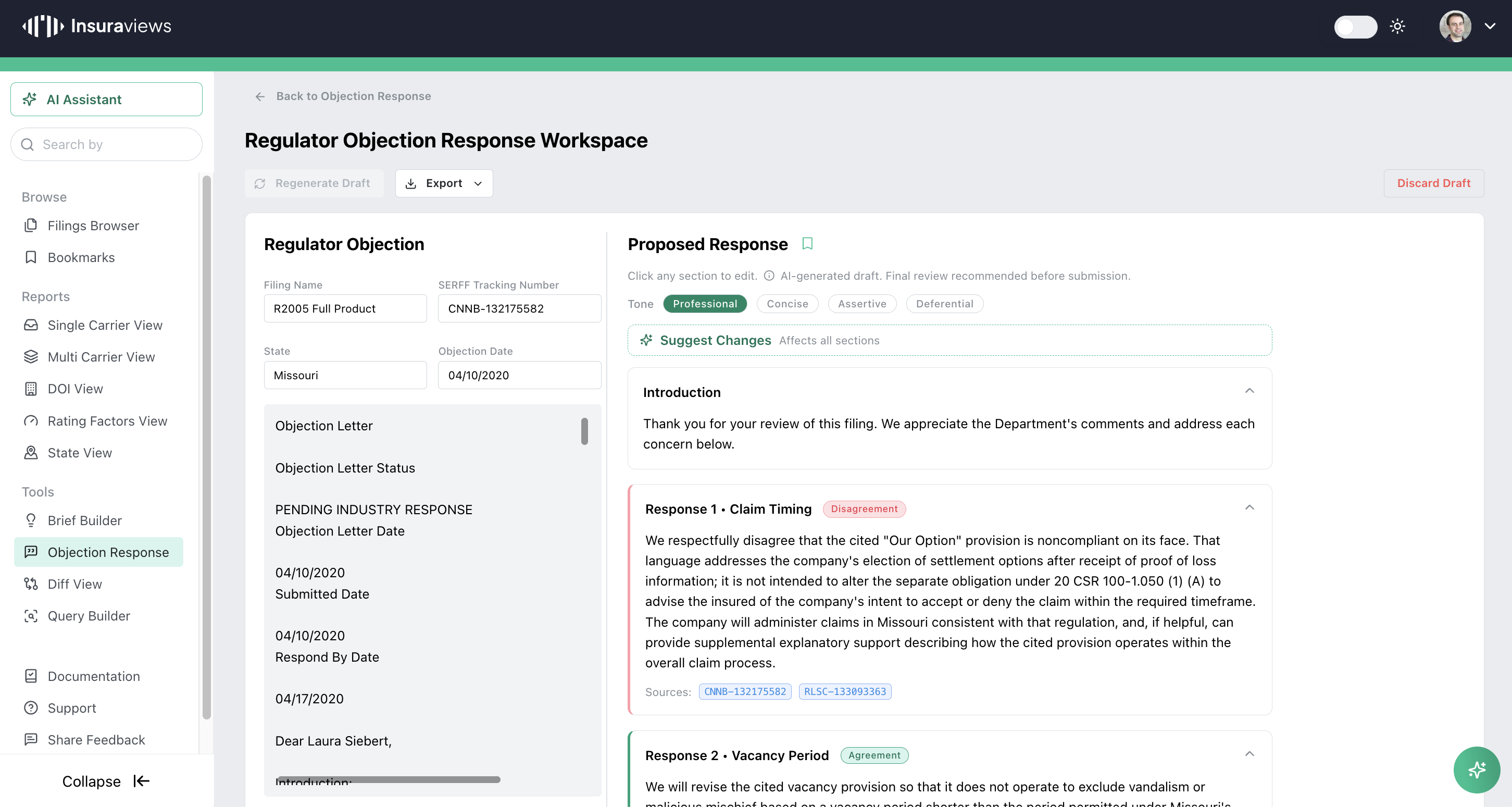
The enhancement reimagines objection response as a dedicated environment for drafting professional response letters, designed around the one-to-one reality of answering a specific objection. You start by bringing the objection in. Upload the regulator's letter as a PDF, or paste the text directly. Insuraviews parses the letter, extracts the key metadata (filing name, SERFF tracking number, state, and objection date), and generates a structured first draft in seconds.
That draft no longer arrives as a wall of text. The workspace lays everything out across three panels: the original objection on the left, your proposed response in the center, and contextual controls on the right. The original letter stays visible the entire time, so you're never toggling between windows to check what the regulator actually said.
This is what makes the feature possible in the first place. A draft response isn't generated in a vacuum, and it isn't the model's best guess at what a regulator wants to hear. It's built on the foundation of the Insuraviews dataset, one of the largest collections of filings and regulator correspondence in the industry.
When you bring in an objection, Insuraviews looks across that dataset for objections like it that have already been raised and successfully overcome, with particular attention to the same state and the same regulator you're dealing with. The patterns that resolved an objection in front of a given Department are exactly the patterns the workspace draws on when proposing your response. In practice, that means the draft reflects what has actually worked with this regulator before, not generic boilerplate, giving you a starting point informed by real precedent rather than guesswork.
And because the draft is grounded in real filings, every response includes source filing references, complete with SERFF tracking numbers, so you can always trace a point back to the precedent behind it and validate the data yourself. Nothing has to be taken on faith; the evidence for each section is one click away.
That grounding is why the responses are credible, why the citations hold up, and why the tool earns a place in a compliance workflow. The AI structures and drafts; the dataset gives it something true to draw on.
The center of the workspace is where the new approach really shows. Instead of one undifferentiated reply, the AI breaks the response into discrete, point-by-point sections that map directly to the regulator's objections. Each section is an editable card, and each card carries a status tag that signals the company's posture at a glance:
Those tags aren't decoration. They let a reviewer scan a complex, multi-point response and immediately understand the strategy: where the company is conceding, where it's explaining, and where it's standing firm. Every section is collapsible and fully editable inline, and each one references the underlying filings, including SERFF tracking numbers, so the support for each argument travels with the text.
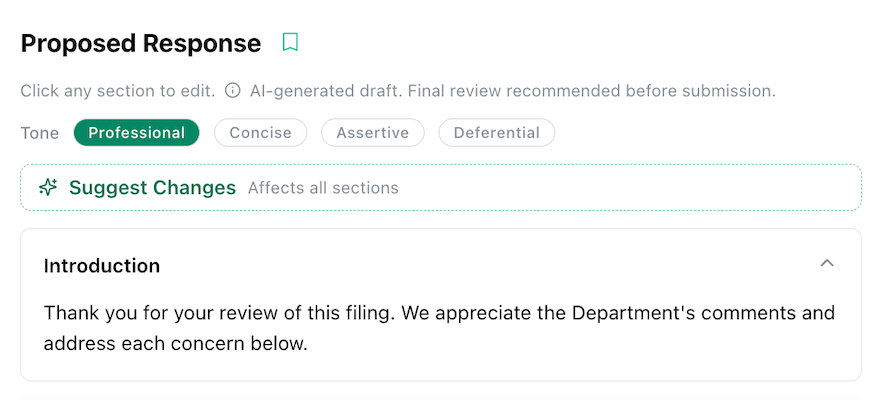
Drafting is rarely one-and-done, so the workspace is built for iteration. A set of tone controls lets you reshape the entire response with a single choice: Professional (the default), Concise, Assertive, or Deferential, depending on the regulator, the state, and how hard you want to lean on actuarial justification.
When you need something more specific, the Suggest Changes input lets you describe the edit in plain language and have the AI revise the draft accordingly. Working at the section level, the controls panel offers targeted moves: rewrite a card as an agreement or a clarification, strengthen a counter-argument, add supporting evidence, remove repetition, or address a concern more directly. Because the workspace keeps a version history as you go, you can experiment freely and return to an earlier draft whenever you want.
Responding to a regulator is no place for invented citations. We've put specific guardrails around the metadata and references the AI produces, so SERFF numbers and product names reflect the actual filing rather than plausible-looking fabrications. The draft is a starting point built from your real data, and because every section surfaces its sources, reviewers can verify each argument before anything goes out the door. The workspace makes that final review faster, not optional.
When the response is ready, exporting it is straightforward. The workspace produces a clean, professional document, available as a PDF or plain text, with the interface tags and status labels stripped out and the formatting preserved, so what you send looks like a letter to a regulator, not an export from an app.
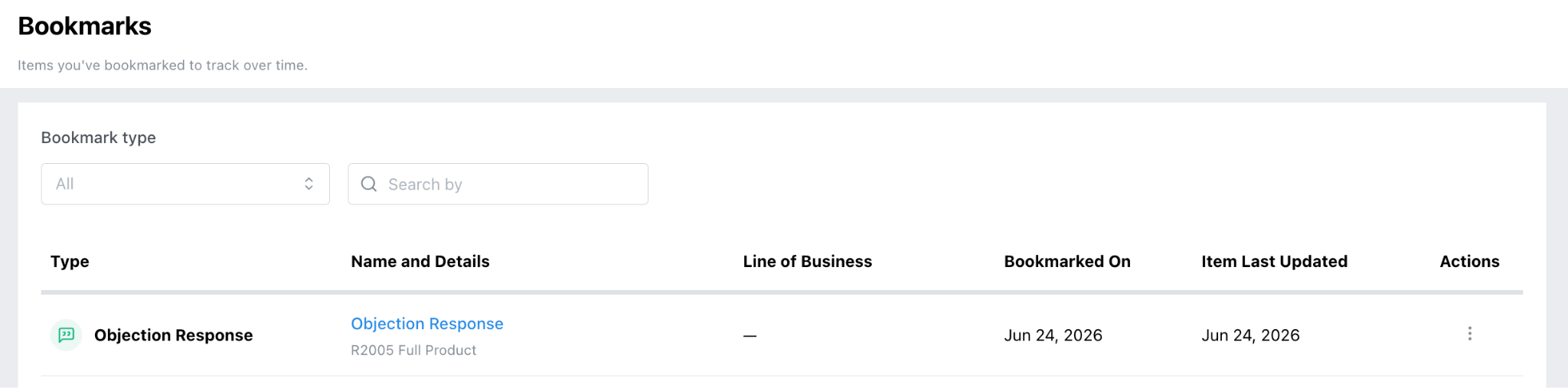
Objection responses are also a new addition to Bookmarks in Insuraviews. You can save an objection response session as a bookmark, then come back to it later and keep editing right where you left off. That continuity matters across cycles. If a regulator comes back with a follow-up objection based on your previous response, you can reopen the bookmarked session from that earlier cycle and craft your follow-up right where the conversation left off.
The new workspace reflects how we think about AI at Insuraviews. It should compress the mechanical parts of expert work, including gathering context, structuring an argument, and drafting clean prose, while keeping the expert firmly in control of judgment and final sign-off, always referencing back to the source data for validation and verification. The result is faster turnarounds on objection letters, more consistent responses across analysts and states, and citations that hold up to scrutiny.
For filing teams managing volume across multiple jurisdictions, that consistency compounds. Fewer second-round objections mean fewer delayed effective dates, and a shared workspace means institutional knowledge no longer lives in one analyst's saved documents.
The benefit extends to the other side of the table, too. DOI reviewers tend to welcome well-structured, well-supported responses: a clear, point-by-point reply that addresses each concern directly and references the relevant filings signals that you've done your homework. Submitting consistent responses that meet requirements cleanly makes the regulator's job easier, and that goes a long way toward resolving objections faster.
The upgraded Objection Response Workspace is available now in Insuraviews. If your team is already using the platform, you'll find it under Objection Response. If you'd like to see how it fits into your filing workflow, reach out for a walkthrough and we'd be glad to show you.


© 2026 Insuraviews. All rights reserved.